
Teams can detect what’s said in a meeting and present real-time captions. And, if you’ve turned on the new meeting experience, your captions will include speaker attribution—so you’ll see not only what’s being said, but who’s saying it.
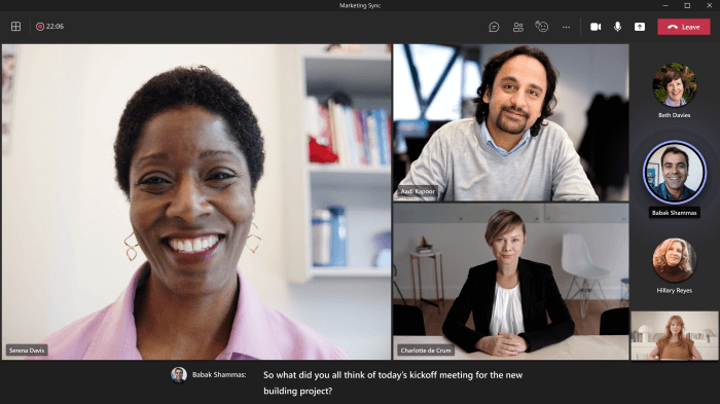
There are a couple ways to get live captions in Teams:
Use built-in captions
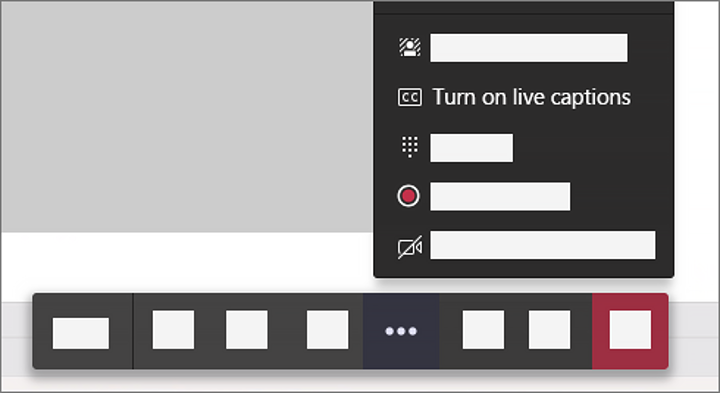
Teams has built-in closed captioning you can turn on from the meeting controls.
Turn captions on and off
Change the language of your captions
1. To the right of the captions, select Captions settings

2. Select Change spoken language.
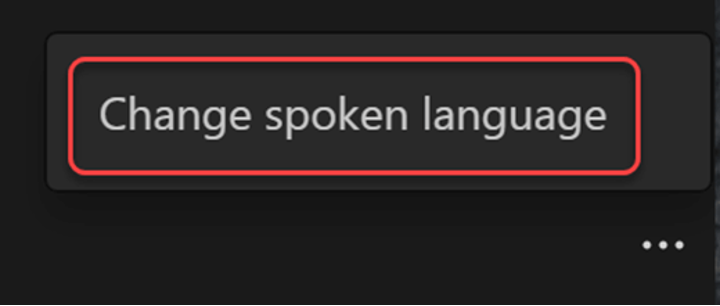
3. Select the language spoken during the meeting. (This is the language of your captions and meeting transcript.)
4. Select Confirm.
You have up to 34 language options for captions:
English (US), English (Canada), English (India), English (UK), English (Australia), English (New Zealand), Arabic (Arab Emirates) (Preview), Arabic (Saudi Arabia) (Preview), Chinese (Cantonese), Chinese (Mandarin), Czech (Czechia) (Preview), Danish (Denmark), Dutch (Belgium) (Preview), Dutch (Netherlands), French (Canada), French (France), Finnish (Finland) (Preview), German (Germany), Hebrew (Israel) (Preview), Hindi (India), Italian (Italy), Japanese (Japan), Korean (Korea) (Preview), Norwegian (Norway), Polish (Poland) (Preview), Portuguese (Brazil), Portuguese (Portugal) (Preview), Russian (Russia) (Preview), Spanish (Mexico), Spanish (Spain), Swedish (Sweden), Thai (Thailand) (Preview), Turkish (Turkey) (Preview), Vietnamese (Vietnam) (Preview)
Read more here